Breakeven
Automatic Stop Loss move to breakeven configuration
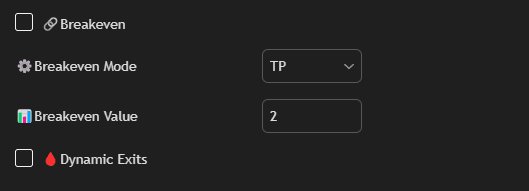
Settings
Check box Breakeven
Enable the function.
Breakeven Mode
Selection of calculation type for breakeven activation:
- %: Move SL after reaching the specified profit percentage.
- ATR: Move based on ATR multiplier.
- TP: Move after reaching a certain TP level (e.g., TP2).
Breakeven Value
Activation level (e.g., 1% or TP2, only the number needs to be specified).
Dynamic Exits
Automatic position closing in overbought and oversold conditions.
Usage
The Breakeven function helps protect your positions from losses by automatically moving Stop Loss to the entry point after reaching a certain profit level.
Examples:
- Set Breakeven Value to 1% — SL will move to breakeven after reaching 1% profit
- Set Breakeven Mode to TP and Breakeven Value to 2 — SL will move to breakeven after reaching TP2
Tip: Enable Dynamic Exits for automatic position closing at overbought/oversold levels (RSI ≥ 70 for Long, RSI ≤ 30 for Short).